How to Set Up Automatic Twitch Raid Shoutouts
To automatically shout out a Twitch raider, connect an incoming-raid event to a shoutout action and use the raider as its target. Twitch can show a follow button to viewers who do not already follow the raider. If you just want a welcome message in chat, use a chat message action with the raider’s name instead.
Set Up the Incoming Raid Trigger
- Connect your Twitch broadcaster account in SheevChat and keep SheevChat running while you stream.
- Open Bot Commands → Automations → + New. Name the automation Twitch Raid Shoutout.
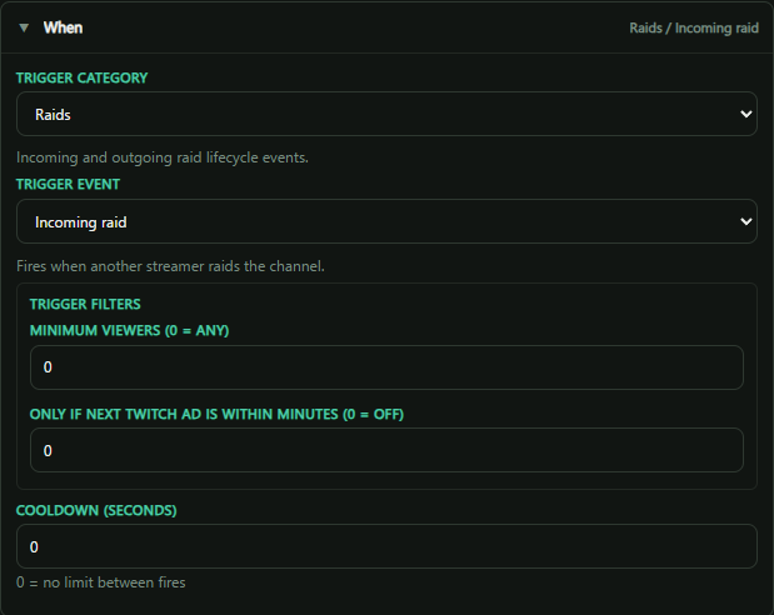
- In When, choose Raids → Incoming raid. In Where, choose Twitch.
- Set Minimum viewers to
0to include raids of any size. Leave Only if next Twitch ad is within minutes at0so the shoutout can run independently of your ad schedule.
Send the Shoutout to the Raider
- In Do, add Shoutout.
- Leave Username (blank = trigger user) empty. That lets SheevChat target whoever sent the raid each time.
- Save the automation and make sure it is enabled.
For a plain-text welcome instead, add Send chat message and use a message such as Thanks for the raid, {user}!. Use Twitch as the destination. A welcome message can also accompany a native shoutout if you want both.
Test It and Check Cooldowns
While your channel is live and has at least one viewer, coordinate a test raid from a channel you know. Confirm the incoming raid appears in SheevChat, then look for the shoutout in Twitch chat. Twitch limits native shoutouts to once every two minutes and once per target broadcaster every 60 minutes. A prior manual shoutout can count toward those limits. Twitch shoutout rules
If the raid appears but the shoutout is missing, check that the automation is enabled, Where is Twitch, and the viewer and ad filters permit the event. Use a different test target or wait for Twitch’s cooldown before trying again.
For more event-driven setups, see Creating Automations. To let moderators send a custom shoutout from chat, see Creating a VIP Shoutout Command.